
1) What is Android?
Answer: Android is an open source operating system
and is mainly popular for Smartphones and Tablets.
This operating system is Linux Kernel
based. Using Android operating system, the developer develops the functions or
programs which can perform basic as well as the advanced type of operations on
the Smartphone.
2) What is Android SDK?
Answer: To develop a mobile application, Android
developers require some tools and this requirement is satisfied by “Android
SDK” which is a set of tools that are used for developing or writing apps.
It has a Graphical User Interface
which emulates the Android environment. This emulator acts as an actual mobile
device on which the developers write their code and then debug/test the same
code to check if anything is wrong.
3) What are the different versions of
Android OS that you remember?
Answer: Given below are the various versions of
Android.
Version
|
Name
|
Android 8.0
|
Oreo
|
Android 7.0 – 7.1.2
|
Nougat
|
Android 6 – 6.0.1
|
Marshmallow
|
Android 5 – 5.1.1
|
Lollipop
|
Android 4.4 – 4.4.4
|
KitKat
|
Android 4.1 – 4.3
|
Jelly Bean
|
Android 4.0-4.0.4
|
Ice Cream Sandwic
|
4) What is the difference between
Mobile Application Testing and Mobile Testing?
Answer: Mobile app testing is the testing of
applications on a device which mainly focuses on functions and features of the
application.
And Mobile Testing is the testing of
the actual mobile device and focuses on the mobile features like Call, SMS,
Contacts, Media Player, inbuilt browsers etc.
5) Name the languages supported for
Android development.
Answer: Java is the widely used language for Android
development.
It also supports C/C++ and when used
with Android SDK, it improves the performance speed too.
6) What are the advantages of Android
Operating System?
Answer: It is an open-source and platform
independent. It supports various technologies like Bluetooth, Wi-Fi, etc
7) Explain Android Architecture
briefly.
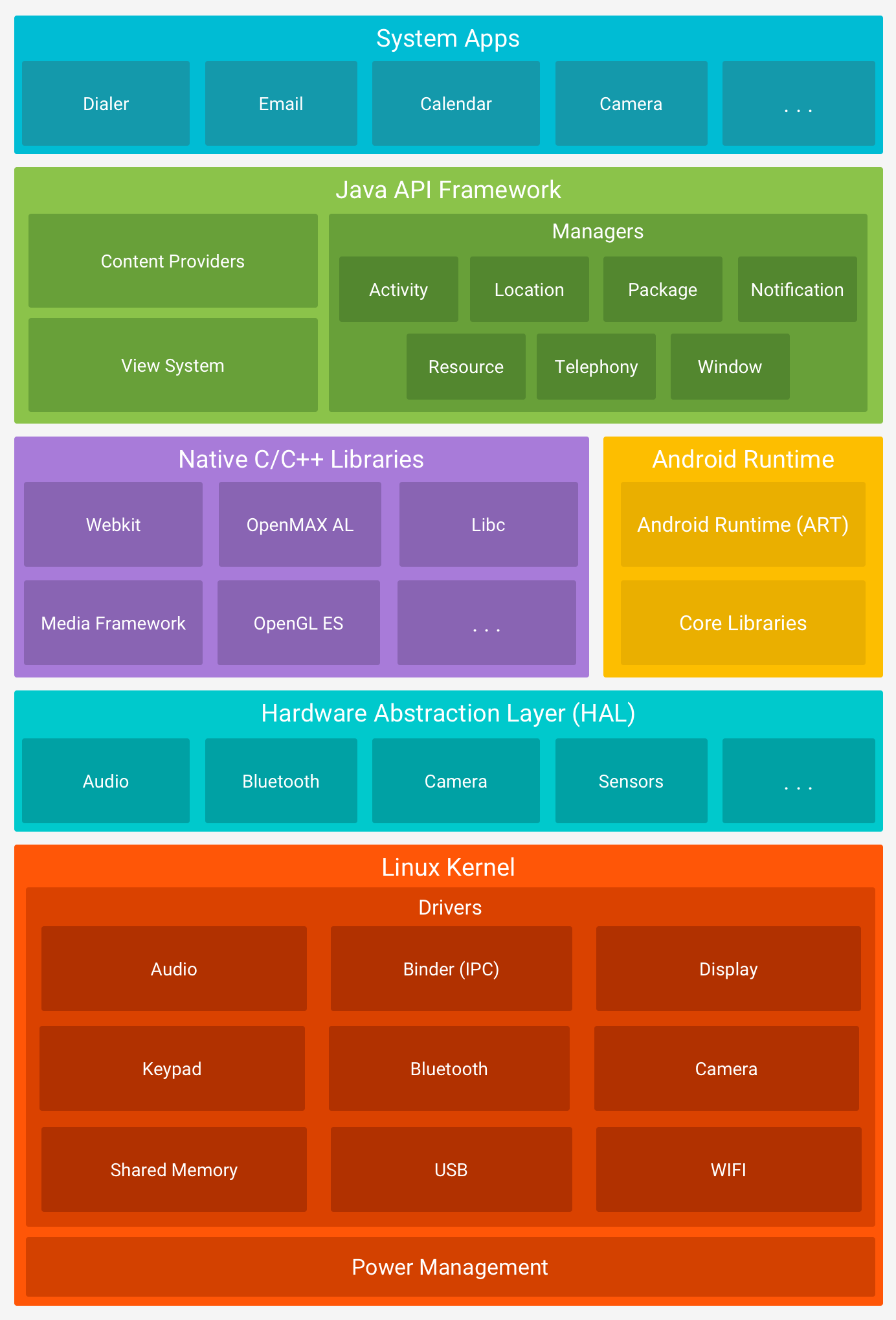
Answer: Android architecture is in the form of
software stack components.
The below diagram describes the
different layers in the Android architecture.
- Linux Kernel: Linux Kernel is placed at the bottom of the software stack and is the foundation of the Android architecture. Using Linux kernel, Android provides a connection between the other layers of the software. It helps to develop drivers like the keypad, display, audio for device manufacture etc.
- Hardware Abstraction Layer (HAL): HAL provides an interface between device drivers and API framework. It consists of library modules which are specific to the hardware component.
- Android Runtime: Linux kernel provides multi-tasking execution environment so that multiple processes can execute each process runs on its own instance of Android Runtime (ART). Android has core runtime libraries like Dalvik VM specific libraries, Java Interoperability Libraries, Android Libraries and C/C++ libraries.
- Application Framework (Java API Framework): The entire android functionalities are available through the API. It consists of multiple services like Activity Manager, Resource Manager, Notification Manager, etc., which form the environment in which the android application runs.
- Applications: The Android application is a top layer and all types of in-built applications such as SMS, Browsers, Contact, etc are included in this top layer. It also includes third party applications which are installed by the user such as Games, etc.
8) Define and explain Android
Framework.
Answer: Android framework is a set of API’s using
which the Android developers write code for the mobile apps. It contains the
methods and classes to write the programming code.
Android framework includes a
different set of tools to create image pane, text field, buttons, etc. It also
includes “Activities” with which the user interacts and “Services”, which are
the programs that run in the background. It is a package of different
components like Intents, Broadcast Receivers, Content Providers, etc.
9) Which components are necessary for
a New Android project?
Answer: Whenever a new Android project is created,
the below components are required:
- manifest: It contains xml file.
- build/: It contains build output.
- src/: It contains the code and resource files.
- res/: It contains bitmap images, UI Strings and XML Layout i.e. all non-code resources.
- assets/: It contains a file which should be compiled into a .apk file.
The below image shows the Project
View once an Android project is created:

10) Provide the important core
components of Android.
Answer: The core components of Android operating
systems are:
- Activity
- Intents
- Services
- Content Provider
- Fragment
11) Explain briefly – what is meant
by Activities?
Answer: Activities are the part of the mobile app
which the user can see and interact with.
For Example, if you open an SMS app which has multiple
activities like create new SMS, add a contact from the address book, write the
content in the SMS body, send SMS to the selected contact, etc.
Activity keeps a track of the
following:
- Keeps track of what a user is currently looking for in an app.
- Keeps a track of previously used processes, so that the user can switch between ongoing process and previous process.
- It helps to kill the processes so that the user can return to their previous state
An activity is implemented as a
subclass of Activity class as shown below:
Public class MyActivity extends
Activity
{
}
{
}
12) What is meant by Services?
Answer: Service is an Android component which runs in
the background and acts independently. It does not provide any user interface.
Though the services are running
behind the scene, a user can continue their work on different apps. Most of the
time, the users are not aware of the services which are running in the
background. These services allow the system to kill the process without
interrupting the user’s ongoing work.
A service is implemented as a
subclass of Service class:
Public class MainService extends
Service
{
}
{
}
13) Explain Activity Lifecycle
briefly.
Answer: When a user interacts with the app and moves
here and there, out of the app, returns to the app, etc. During all this
process “Activity” instances also move in the different stages in their
lifecycle.
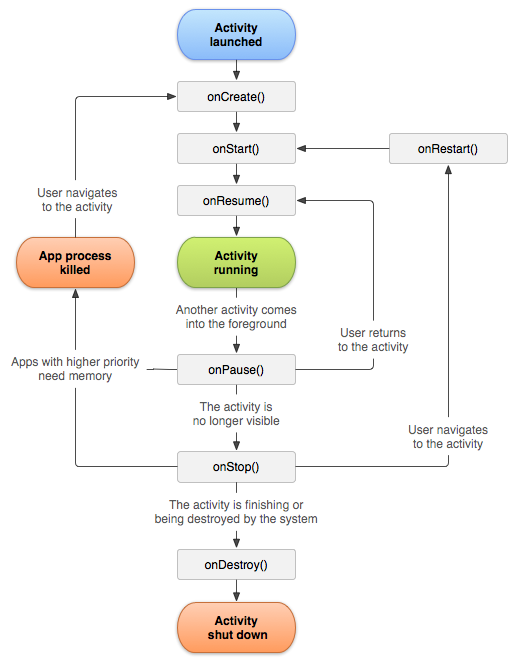
There are seven different
states like – onCreate(), onStart(), onRestart(),
onResume(), onPause(), onStop(), and onDestroy(). These are
termed as a ‘callback’. Android system invokes these callbacks to know that the
state has been changed.
The below-given diagram describes the
Activity Lifecycle:
When a user is working on an app,
then there are many activities involved in it like Open, Close, Save, Delete,
Send, etc.
Based on the user action these
activities are partially disconnected from the UI but these activities always
reside in the memory so that when the user calls back the same activity, the
user will be in the same state where he has left off.
14) What is an Intent?
Answer: Android has an Intent class when the user has
to navigate from one Activity to another. Intent displays notifications from
the device to the user and then the user can respond to the notification if
required.
Given below are the two types:
- Implicit Intents
- Explicit Intents
15) Explain Implicit and Explicit
Intents.
Answer: Implicit Intent calls the system components
while explicit Intents invoke the Activity class.
16) What is the importance of setting
up permission in app development?
Answer: Once the permissions are set for the app
development, then the data and code are restricted to the authorized users
only.
If the code is kept without any
restriction or if it is accessible to anyone then there are chances of
compromise of code which results in defect leakage.
17) What is .apk extension in
Android?
Answer: It is a default file format that is used by
Android Operating System. Application Package Kit (APK) is used for
installation of mobile apps. The .apk contains resource file, certificate,
manifest file and other code.
APK files are archive files in the
zip format with .apk extension.
18) What is the database used for
Android platform?
Answer: SQLite is the database that is used for
Android platform. It is an open-source, serverless database.
19) What is ANR in Android?
Answer: ANR stands for Application Not Responding. It
is a notification or pop-up displayed by the Android platform whenever the
application is performing too many functions at a time and if it is suddenly
not responding for a long time to the user action.
20) Which are the dialog boxes
supported by Android platform?
Answer: Android supports four types of dialog
boxes:
- AlertDialog: It has a maximum of 3 buttons and sometimes AlertDialog includes check boxes and Radio buttons to select the element.
21) What is ADB?
Answer: Android Debug Bridge (ADB) is a command line
tool which performs shell commands.
ADB is used for direct communication
between the emulator ports. It gives the direct control of the communication
between the emulator instances to the developer.
22) What is ActivityCreator?
Answer: ActivityCreator is a batch file and shell
script which was used to create a new Android project. It is now replaced by
“Create New Project” in Android SDK.
23) What is Orientation?
Answer: Orientation is the key feature in Smartphones
nowadays. It has the ability to rotate the screen between Horizontal or
Vertical mode.
Android supports two types of screen
Orientations as mentioned below:
- Portrait: When your device is vertically aligned.
- Landscape: When your device is horizontally aligned.
setOrientation() is a method using
which you can set a screen alignments. HORIZONTAL and VERTICAL are two values
which can be set in the setOrientation() method. Whenever there is a change in
the display orientation i.e. from Horizontal to Vertical or vice versa then
onCreate() method of the Activity gets fired.
Basically, when the orientation of
the Android mobile device gets changed then the current activity gets destroyed
and then the same activity is recreated in the new display orientation. Android
developers define the orientation in the AndroidManifest.xml file.
24) What is AIDL?
Answer: In the Android platform, there are remote
methods which facilitate the use of methods from one program to another. To
create and implement the remote methods the first step is to define
communication interface in AIDL.
AIDL stands for Android Interface Definition
Language. It facilitates the communication between the client and service. It
also communicates the information through inter-process communication.
For communication between processes,
the data is broken down into chunks which are easily understandable by the
Android platform.
25) What are the data types supported
by AIDL?
Answer: Data Types supported by AIDL are as
follows:
- String
- List
- Map
- charSequence
- Java data types such as INT, Long, Char, Boolean etc
26) Explain AndroidManifest.xml file and
why do you need this?
Answer: Every application must have
AndroidManifest.xml file in the root directory. It contains the information
about your app and provides the same to the Android system.
The information includes the package
name, Android components such as Activity, Services, Broadcast Receivers,
Content Providers, etc. Every Android system must have this information before
running any app code.
AndroidManifest.xml file performs the
following tasks:
- It provides a name to the Java package and this name is a unique identifier for the application.
- It describes the various components of the application which include Activity, Services, Content Providers, etc. Also, it defines the classes which implement these components.
- It is responsible to protect the application and it declares the permission for accessing the protected part of the app.
- It also declares the Android API which is going to be used by the application.
- It contains the library file details which are used and linked to the application.
27) What all devices have you worked
on?
Answer: There are many mobile devices available in
the market with different operating systems.
Specifically, I have worked on
Android, Windows, Symbian, iPhone, etc
28) Which tools are used for
debugging on the Android platform?
Answer: To understand the cause of the failure or
cause of any issue, debugging is important. On the Android platform Android
Monitor.bat utility is used while on iOS platform, iPhone Configuration
utility is used for debugging purposes.
There are different tools for
debugging which include – Android DDMS, Android Debug Bridge, iOS simulator,
Debugging from Eclipse with ADT, Remote debugging on Android with Chrome etc.
29) Which scenario can test only on
real devices but not on emulator?
Answer: Emulators are used for performing similar
kind of testing which is performed on the real devices. Basically, emulators
are used as a replacement for real devices as sometimes real devices are not available
for testing, use of real mobile devices for testing purpose is costlier at
times.
But there are few scenarios which
cannot be tested using emulator, these can be tested only using real devices.
These scenarios are interrupted scenarios i.e. message, phone call interruption
while using the app, low battery, Bluetooth, memory card mount and unmount etc.
30) Name the mobile automation tools
that are available in the market.
Answer: There are quite a few mobile automation
testing tools that are available in the market but these are used only if the
project requires it and if the application supports the automation.
These tools are paid as well as free
tools, hence analysis needs to be done within the project team and then the
appropriate mobile automation tool needs to be selected. Silk Mobile, SeeTest,
Ranorex are the paid mobile automation tool while Appium, KIF, Robotium,
Calabash are few free tools.
31) How do you troubleshoot android
application which is crashing frequently?
Answer: Given below are the few steps that we need
to follow while troubleshooting the crashing issue:
- Free up memory space: There is only a limited space available on the mobile devices for mobile apps. To avoid crashing issue or memory related issue, you need to first check the memory space.
- Clear app data usage: You can clear the app data using the Application Manager under “Settings”. This will clear the cache memory and allow some free space to install another app or it will boost up your current app.
- Memory Management: Some apps run perfectly on one type of mobile device but the same app may not work on another type of device as for such devices the processing power, memory management, and CPU speed is different. For any app to run properly on any type of mobile device, you should manage the memory on the device.
- Compatibility issue: It is always not possible to test mobile app on all mobile devices, browsers, operating systems etc. So you need test your mobile app on as many mobile devices as you can in order to avoid any compatibility issue.
32) How do you find memory leaks in
the mobile app on Android platform?
Answer: Android Studio is using Android Device
Manager (ADM), this ADM is used to detect the memory leaks in the Android
platform.
When you open ADM in the Android
Studio then on the left-hand side of the ADM, you will find your device or
emulator in which a heap sign will be displayed. When you are running any
mobile app then you will see the heap size, memory analysis and other
statistics displayed on it.
33) What is DDMS?
Answer: Android Studio has debugging tools known as
DDMS i.e. Dalvik Debug Monitor Server.
It has wide debugging features which
include:
- Port forwarding services.
- Screen capture on the device.
- Thread and Heap information.
- Incoming call and SMS spoofing.
- Logcat
- Radio state information.
- Location data spoofing.
DDMS is integrated with the Android
studio. To launch the DDMS, you need to open Android Device Monitor (ADM) first
and then click on the DDMS menu button. Once DDMS is launched, then on the
left-hand side the list of connected devices are displayed along with the
processes which are running on each device.
With the help of DDMS, you can debug
both on real devices and emulators.
34) What are the different data
storage options available on the Android platform?
Answer: Android platform provides a wide range of
data storage options. These options must be used based on the need such as data
is secure and used with the permission only or can be accessed publicly.
Below is the list of data storage
options on the Android platform:
- SharedPreference: It stores data in XML files. It is the simplest way to store private data in the key-value pair.
- SQLite: It stores structure data in the private database.
- Internal Storage: It stores data in the device file system and any other app cannot read this data.
- External Storage: Data is stored in the file system but it is accessible to all apps in the device
35) Explain Sensors in Android.
Answer: Android-enabled devices have built-in Sensors
which measures Orientation, Motion and other conditions.
These sensors provide data with high
accuracy, which will help to monitor positioning and movement of the device.
Some of the sensors are hardware based and few are software based.
There are three categories of sensors
as mentioned below:
- Motion Sensors: These sensors measure the rotational & acceleration forces and it includes gravity sensors, rotational vector sensor, accelerometers, etc.
- Environmental Sensors: It measures air temperature, pressure, humidity, etc.
- Position Sensors: It measures the physical position of the device and includes orientation sensors and magnetometers.
There are four types of Java Classes
as shown below:
- Sensor Manager
- Sensor
- SensorEvent
- SensorEventListener
35 IMP Android Interview Questions
![35 IMP Android Interview Questions]() Reviewed by Saurabh
on
July 12, 2018
Rating:
Reviewed by Saurabh
on
July 12, 2018
Rating:
No comments: